
SKYLINE STRIKE
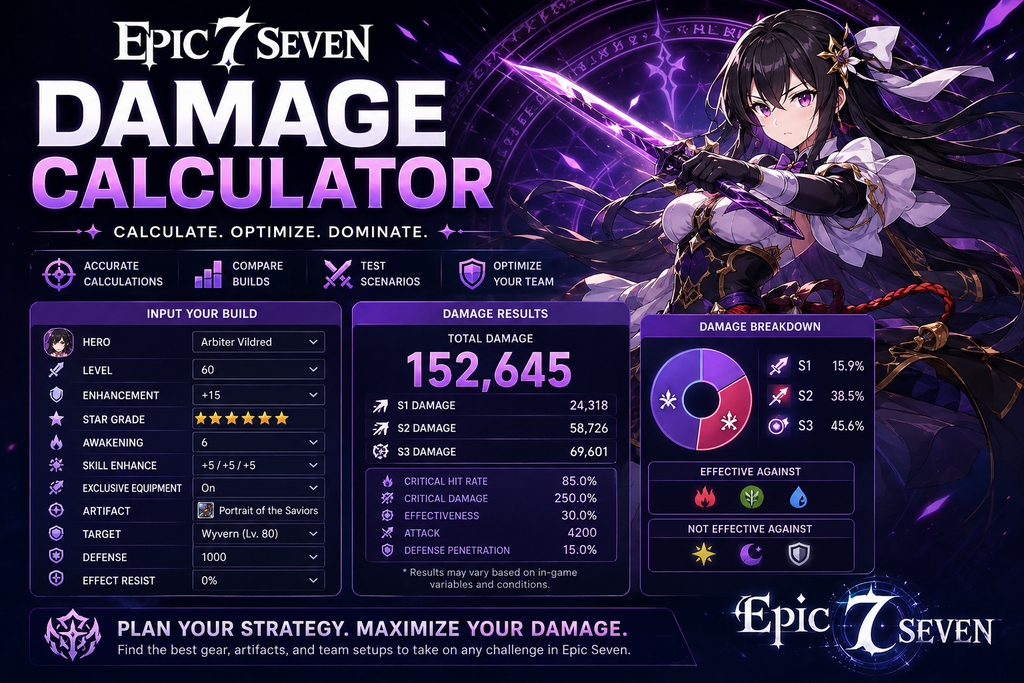
Epic Seven Damage Calculator
Atk Total = Attack × (1.5 if Attack Up, otherwise 1)
Power Total = 1.871 × Power Multiplier
Mult Total = Multiplicative Multiplier × (1.1 if Elemental Advantage) × Power Total
Defense Total = Enemy Defense × (0.3 if Defense Down, otherwise 1)
Normal Damage = ((Atk Total × Move Multiplier) + Flat Modifier) × Mult Total ÷ (Defense Total / 300 + 1)
Critical = Normal × Crit Damage Multiplier
Crushing = Normal × 1.3
Miss = Normal × 0.75
Epic Seven Damage Calculator
In Epic Seven, it can be hard to tell exactly how much damage a hero will deal just by looking at the stats on the screen. Attack is important, but it is only one part of the picture. Critical Hit Chance, Critical Hit Damage, gear, skills, Artifacts, buffs, debuffs, and enemy Defense can all change the final number.
An Epic Seven Damage Calculator gives you a simple way to test different setups before making changes to your hero. You can enter your stats, choose a skill, add the effects you want to test, and see how the estimated damage changes.
This can be useful when you are building a new hero, improving an existing one, or trying to decide which gear setup makes more sense for a particular fight.
How to Use the Epic Seven Damage Calculator
Getting started with the calculator is usually pretty simple. First, select the hero you want to test and enter the stats from your current build.
Depending on the calculator you are using, you may be able to add details such as:
- Attack
- Health
- Defense
- Speed
- Critical Hit Chance
- Critical Hit Damage
- Effectiveness
- Effect Resistance
- Skill levels
- Equipment stats
- Artifact effects
- Buffs and debuffs
- Enemy Defense
- Target conditions
Once your information is entered, choose the skill or attack you want to check. The calculator will use those values to estimate the damage.
You can then make a second setup and compare the two results. For example, you could test your current gear and then replace one piece with another to see whether the change actually improves your damage.
Why Use a Damage Calculator in Epic Seven?
Gear optimization is a big part of Epic Seven, and sometimes it is difficult to decide which stats are worth keeping.
Imagine you have one build with more Attack and another with more Critical Hit Damage. Both may look good on paper, but that does not necessarily tell you which one will produce the better result.
This is where an Epic Seven damage calculator can help. You can test both builds against the same target and with the same conditions, making the comparison much easier.
It can also save you from making changes based purely on assumptions. If you are considering a gear upgrade, for example, you can test the expected stats first and get an idea of how much difference they could make.
Understanding Epic Seven Damage
There are several factors behind the damage number you see during a battle. A hero’s Attack is usually an important part of the calculation, but the skill being used and its scaling also matter.
Different heroes have different skill effects and mechanics, so the same stat increase will not necessarily have the same value for every hero. Some skills may benefit more from certain stats, while others may have additional effects that change their overall damage.
Critical hits are another major factor. Critical Hit Chance affects how often you land a critical hit, while Critical Hit Damage determines how much stronger that critical hit is.
The enemy matters too. A target with higher Defense can take less damage, while certain buffs and debuffs can change the result significantly.
Because so many factors can interact, looking at one stat by itself does not always give you a good idea of how a build will perform.
Compare Different Hero Builds
One of the easiest ways to get value from a damage calculator is by comparing builds.
You can use it to check things like:
- Is additional Attack better than more Critical Hit Damage?
- How much damage will a gear upgrade add?
- Is a skill upgrade worth the resources?
- How much extra damage does an Attack buff provide?
- What happens when the enemy’s Defense is reduced?
- Which gear setup gives the better critical hit?
- Does an Artifact effect make a noticeable difference?
Try to keep the test conditions the same when making a comparison. If you change several things at once, you may get a different result without knowing exactly what caused it.
A simple approach is to start with your current build and change only one stat or item. Run the calculation again and compare the numbers. This makes it easier to see which change is actually helping.
Test Gear and Stat Changes
Choosing the right gear is not always straightforward. Two pieces can have different combinations of useful stats, and the better choice depends on the hero and the rest of the build.
For example, one setup may give you more Attack, while another gives you additional Critical Hit Damage. Instead of guessing which one is better, you can enter both setups into the Epic Seven Damage Calculator and compare the results.
The same idea works when you are deciding whether to upgrade a piece of gear. If you have an idea of what the final stats might look like, you can test them and see whether the potential damage increase is meaningful.
This can be especially useful when resources are limited and you do not want to invest in every possible upgrade.
Critical Hit Damage and Consistency
Critical-focused builds can be a little misleading if you only look at the biggest number.
A hero with high Critical Hit Damage can produce impressive damage when a critical hit occurs. But if the hero has a lower Critical Hit Chance, those critical hits may not happen as consistently.
That is why it can be helpful to look at both sides when comparing builds. A build that produces a slightly smaller critical hit but lands critical hits more consistently may perform better over time.
The ideal balance depends on the hero, skill, gear, team, and type of content you are playing. There is no single Crit setup that is perfect for every situation.
Buffs, Debuffs, and Enemy Defense
The conditions of a battle can have a big effect on your final damage.
For example, a hero attacking an enemy with normal Defense may produce a very different number from the same hero attacking a target affected by a Defense-related debuff. Team buffs can also increase the damage of certain attacks.
When testing a build, include the buffs and debuffs that you expect to have active during the attack. This will give you a result that is more relevant to the situation you are actually trying to analyze.
If you are comparing two heroes, try to use the same enemy Defense and combat conditions for both. That way, the difference in the results comes mainly from the heroes or builds themselves.
PvE and PvP Damage Testing
A damage calculator can be useful for both PvE and PvP, although you may use it differently for each.
For PvE content, you might want to see how much damage a hero can deal against a particular boss or enemy. You can test different builds and check whether your hero can reach the damage level you need.
PvP is harder to predict because opponents can have different gear, defensive stats, buffs, and other effects. Even so, testing specific situations can help you understand what your hero is capable of under certain conditions.
Rather than looking only for the biggest possible number, try testing situations that are likely to happen in an actual fight.
Check the Calculator’s Assumptions
A calculator can give you a useful estimate, but it should not always be treated as an exact copy of the game’s damage output.
Hero-specific mechanics, skill conditions, modifiers, rounding, and effects that are not supported by a particular calculator can cause differences between the estimated number and the number you see in-game.
Before comparing builds, check the calculator settings carefully. Make sure the correct hero, skill, skill level, buffs, debuffs, enemy Defense, and other relevant conditions are selected.
The closer your settings are to the situation you want to test, the more useful the comparison will be.
Plan Your Next Upgrade
Epic Seven requires resources for improving heroes, equipment, skills, and other parts of your account. Before spending those resources, it can be helpful to know what kind of improvement you are likely to get.
An Epic Seven Damage Calculator lets you test possible upgrades before committing to them. You can enter your current build and then create another version with the stats you are considering.
Compare the two results and see whether the difference is large enough to justify the upgrade.
This can be particularly helpful when you have several possible improvements and are trying to decide which one should come first.
Final Thoughts
An Epic Seven Damage Calculator is a handy tool for anyone who wants a better understanding of hero damage and build optimization. It lets you experiment with Attack, Crit stats, gear, skills, Artifacts, buffs, debuffs, and enemy Defense without having to test every combination manually in the game.
For the most useful results, keep your test conditions consistent and change one thing at a time. This makes it much easier to see where the extra damage is actually coming from.
Whether you are working on a PvE build, preparing a hero for PvP, or simply curious about how a different gear setup would perform, a damage calculator can help you make more informed choices and get a clearer idea of what your hero can do.